• About Me
  • Contact Me

KAinspired

  • Blog
  • Pinterest Tips
  • Blogging Tips
  • DIY
  • Cricut
  • Etsy Shop
  • FREE FACEBOOK GROUPS

MAKE LABELS WITH A CRICUT

This post may contain affiliate links, which means I get a commission if you decide to make a purchase through my links, at no cost to you.

14 May

Sharing is caring!

  • Share
  • Tweet

If you are ready to organize your home, you’ll definitely want to learn how to make labels with a Cricut to keep all your items organized.

If you’ve watched the latest season of The Home Edit on Netflix, then you might be on an organizing kick. Let’s face it – the organized spaces they create are gorgeous and inspiring!

And if you have a Cricut, you can easily make your own labels to create your own organized and tidy space.

You can create custom and beautiful labels to organize your pantry, kitchen, and bathroom!
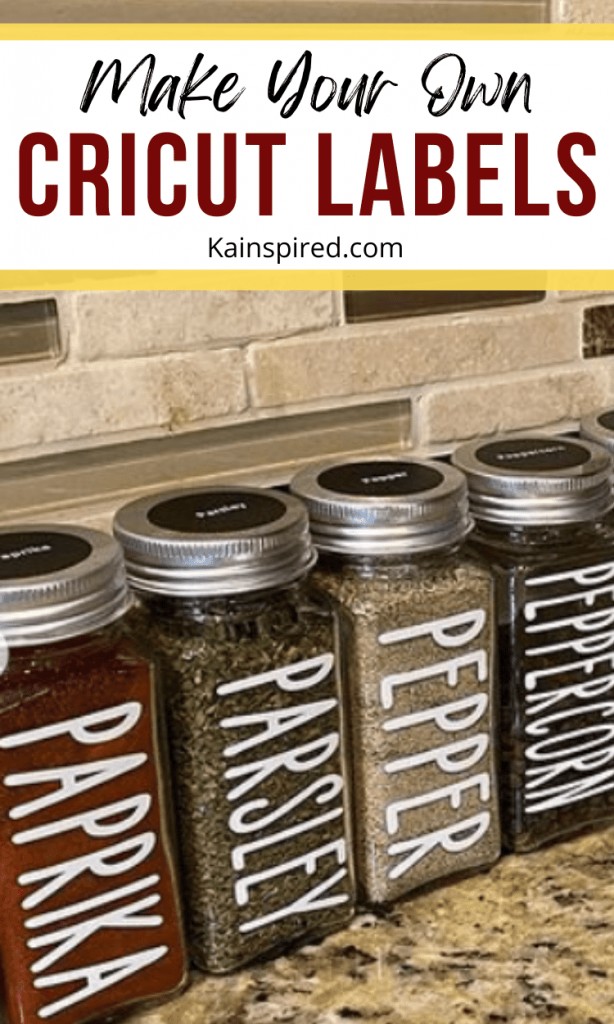
MAKE LABELS WITH A CRICUT

HOW TO MAKE LABELS WITH A CRICUT

Making labels with your Cricut is an easy way to get your home organized. You can literally put labels on anything!

By labeling your space, it gives everything a home. So you’ll always know where your items go.

THINGS YOU NEED TO MAKE CUSTOM LABELS

  • Cricut Machine – I make mine with a Cricut Air 2 but you can use any Cricut Machine
  • Vinyl – permanent or removable vinyl
  • Cricut Basic Toolset – to help with weeding and applying the vinyl
  • Standard Grip Mat
  • Transfer Tape
  • Containers

MAKE LABELS WITH CRICUT

  1. Choose a pretty font that you’ll use for your labels. You can pick a font from Cricut Design Space or Upload your own font to Cricut Design Space.
  2. Create the text or image in Cricut Design Space. Don’t forget to size it.
  3. Load your Cricut Standard Grip Mat with the vinyl into your Cricut Machine. Adjust your Cricut Settings to the material you are using. Then press the flashing Go button.
  4. Weed your Cricut Decal by removing the pieces you don’t want with Cricut Basic Toolset.
  5. Apply transfer tape over your design. Flip the design over and use your Cricut Scraper tool to burnish (rub) the vinyl design onto the transfer tape.
  6. Slowly remove the vinyl backing.
  7. Next, clean your project surface. Once dry, apply your design with the transfer tape to your project. Burnish (rub) the design of your project.
  8. Slowly remove the transfer tape to leave the viny on your project.

THINGS TO LABEL WITH CRICUT

Now that you know how to make labels with a Cricut, you are going to want to label everything in sight!

And if you look around your home, there are so many things you can label to help you stay organized and keep items in their place.

You can create Cricut labels for:

  1. Pantry Zones
  2. Pantry Containers
  3. Drawers
  4. Drawer Dividers
  5. Storage Bins
  6. Closet Shelves
  7. Refrigerator shelves
  8. Refrigerator Containers
  9. Refrigerator Drawers
  10. Above Hooks
  11. Cleaning Shelves
  12. Spice Jars
  13. Kitchen Containers

MAKE LABELS WITH A CRICUT

Like this:

Like Loading…

Related Posts

Filed Under: Cricut Tagged With: Cricut, cricut labels, cricut projects, Cricut tips, make labels with cricut, make your own labels

GRAB YOUR COPY OF THE FREE PINTEREST AUDIT CHECKLIST

« CRICUT CUTTING PROBLEMS: TIPS FOR CLEAN CRICUT CUTS
BEST CRICUT FONTS FOR LABELS »

Reader Interactions

Primary Sidebar

Recent Posts

  • HILARIOUS HALLOWEEN COSTUMES FOR COUPLES
  • 5 Fast Ways to Boost Your Credit Score (That Actually Work)
  • Top Things to Do in Narragansett, Rhode Island
  • BEST THINGS TO DO IN SALEM
  • WHERE TO BUY CRICUT BLANKS
  • Best Travel Gadgets

GRAB YOUR COPY OF THE FREE PINTEREST AUDIT CHECKLIST

Categories

KAinspired is a participant in the Amazon Services LLC Associates Program, an affiliate advertising program designed to provide a means for sites to earn advertising fees by advertising and linking to Amazon.com.

  • Disclosure Policy
  • PRIVACY POLICY

Copyright © 2026 · Refined theme by Restored 316

This website uses cookies to improve your experience. We'll assume you're ok with this, but you can opt-out if you wish.Accept Read More
Privacy & Cookies Policy

Privacy Overview

This website uses cookies to improve your experience while you navigate through the website. Out of these, the cookies that are categorized as necessary are stored on your browser as they are essential for the working of basic functionalities of the website. We also use third-party cookies that help us analyze and understand how you use this website. These cookies will be stored in your browser only with your consent. You also have the option to opt-out of these cookies. But opting out of some of these cookies may affect your browsing experience.
Necessary
Always Enabled
Necessary cookies are absolutely essential for the website to function properly. This category only includes cookies that ensures basic functionalities and security features of the website. These cookies do not store any personal information.
Non-necessary
Any cookies that may not be particularly necessary for the website to function and is used specifically to collect user personal data via analytics, ads, other embedded contents are termed as non-necessary cookies. It is mandatory to procure user consent prior to running these cookies on your website.
SAVE & ACCEPT
Loading Comments...
%d