Do you want to learn how to find Keywords to use with Pinterest? This post will show you how to find the best keywords to use with Pinterest and all the places you should use keywords.
This post was updated June 2020 with the latest tips on how to find keywords to use with Pinterest.
Pinterest is a powerful platform that has over 250 million users who use it every single month. These users go to Pinterest to search for new ideas, inspiration, and creativity.
Pinterest is also a great resource to help bloggers drive thousands of users to their blog every month. In order to drive traffic to your website, you need to appear in the search results on Pinterest.
So if you want to use Pinterest for your business to drive more traffic, then this post is for you. I have a true passion for Pinterest marketing and I am going to teach you how to use keywords on Pinterest so you can increase your Pinterest engagement.

What Are Keywords?
Pinterest Keywords are descriptive terms that describe what your content is about. They are words or phrases that one uses when searching for something.
Using the right keywords is extremely important with Pinterest.
Pinterest is a visual search engine that displays images, which is known as Pins. So you want to use descriptive and relevant keywords that describe your Pin so you can appear in the Pinterest Search Results.
Why Are Keywords Important?
Keywords are important because people use keywords when searching for a topic or an idea.
So you want to include the same keywords or phrases that people are searching for in your content so you can show up in their search results.
By showing up in their search results, you will increase your chances for your content to be viewed by them. They will click to your profile and click through to your pins and go to your website.
Which Keywords Should You Use?
Using the right keywords all throughout your Pinterest account is crucial if you want to appear in the Pinterest search results.
In order to find the right keywords to use, you will need to do some Keyword Research. You don’t need an expensive keyword research tool to help you figure out which keywords to use with Pinterest.
There are two different keyword research methods I use to find keywords to use with Pinterest. I even use these methods when researching keywords and SEO to use with my social media accounts and blog.
how to find keywords to use with Pinterest
Pinterest gives you all the information you need FOR FREE. So you don’t need to pay for a keyword research tool to help you with your keyword research.
Step 1: Go to Pinterest and type in a keyword related to the topic/niche that you need keywords for and click search.

Step 2: Once you type in your keyword and click search, below the search bar you will see a list of words in different colored boxes. THESE ARE KEYWORDS!
Pinterest is suggesting other words that are related to the keyword you originally searched.
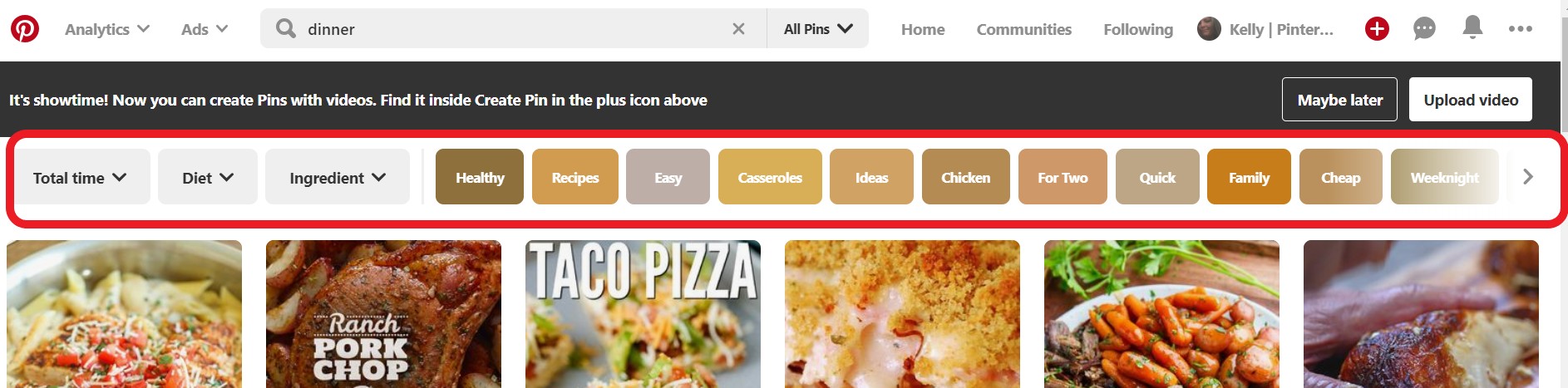
In the example above, I searched the keyword dinner. In those colored boxes below the search bar are other keywords related to dinner that people are searching for.
So people are searching for healthy dinner, dinner recipes, easy dinner, dinner casseroles, etc. These are keywords you can use in your content if they are related to your topic.
You can click each of the colored boxes and it will add the keyword to your search phrase. As you keep adding words, you’ll see the search results change to get more specific. Keep adding the search terms you see in the colors boxes because they are all trending search terms.
HOW TO USE PINTEREST KEYWORDS
In order to increase your chances of appearing in the Pinterest Feed and Pinterest Search Results, you will want to use Keywords in a variety of places.
Adding Pinterest Keywords all over your account will increase your chances of being seen and your audeince engaging with your account and your content.
Whenever you add keywords to Pinterest, you always want to start with the best keywords first and don’t include word that’s have no value.
- Pinterest Display name: Use Keywords in your Pinterest Display name to describe who you are an what you do. This will increase your account to appear in search results.
- Pinterest Boards: Create Boards that are related to your Niche. When creating boards there are two places you need to include keywords: The board name and the board description should include keywords that is related to the content you will pin to that board.
- Pins: Your Pinterest Pins have two places that need relevant keywords, the pin title and the pin description. Always start with the best keywords first and don’t include work
HOW TO SEARCH FOR KEYWORDS ON PINTEREST
Being seen on Pinterest is important if you want to use Pinterest to drive traffic to your website.
Optimizing your Pinterest Account for SEO is crucial if you want any chance of appearing in search results. Always include focused and relevant keywords that is related to your topic.
Including these tips in your Pinterest Marketing Strategy will give you the best chance to be seen on Pinterest. Your account will be visible and will continue to grow.
Don’t forget to check out my blog post on How to Make a Pinterest Pin go Viral.
If you need more tips on how to improve you Pinterest Account or want to learn How To Make Money From Pinning on Pinterest, check out my Facebook Group: Pinning for a Profit.

Great post! I never used keywords before..this is very helpful! Thank you!
Thank you so much for this article It’ really helpful 😍
Really helpful post! I have been researching more information on how to incorporate pinterest into my blog and gain the maximum benefits of marketing. Thanks for the info!
Wow! I really need to do this!! Thank you!!
Wow! Lots of great information here. Thank you!
I haven’t tried Pinterest yet. Now I have some ideas about it. Thanks.
Keywords are extremely important for helping people on the internet be able to find your content. This is a great way to find keywords to use on Pinterest. Thanks for sharing it with us!
Keywords is the game changer, I tried to use keywords in each individual pin and I saw a boost in my blog traffic
I am so happy it is working with you. Keywords can be so powerful.
Just what I really need. Thank you very much for this. This is very helpful.
I’ve been learning Pinterest marketing for the past few weeks, and this post helped me. Thank you for this.
This is a brilliant post and really useful. Thanks for sharing 🙂
I never did learn how to use the right key words. Maybe now I can work on growing my Pinterest by using the tips here. Thanks!
I am interested in learning how to earn from pinning on Pinterest. I’ll bookmark this post for future use. Thank you for sharing a valuable information.
I can definitely help with that. I have a few other blog posts on this topic and a facebook group that you can join too! Link to the facebook group at the top of the page.
Pinterest is still one of those monsters I am trying to learn. Thank you for the helpful post!
What else do you want to learn when it comes to Pinterest? I would love to help you with it.
I’ve been wondering how to make keywords work for me – had no idea it was so simple!
I really appreciate this article. It helped me out a whole lot. Now, it is time to start implementing key words.
Useful post. Pinterest is very much a mystery to me.
Pinterest can be bring a ton of traffic to your blog. So you should definitely use it if you don’t. Let me know what else you may struggle with when it comes to Pinterest.
Really needed this. I struggle sometimes trying to find the right words and the right things to post. Thanks for sharing. I also pinned the post to make sure that I always have it on my pinterest.
Let me know what else you may be struggling with when it comes to Pinterest. I’d be happy to help and write a blog post or two 🙂
This is so useful to know! I’m a big Pinterest fan (www.pinterest.co.uk/followingtherivera) and will put this into practice for sure!
Wow this is really good, thank you for sharing, we have been strugling with pinterest, but now I will save this and re-read it to better understand keywords, and then I just hope that out pinterest account goes up in numbers. I didn’t know key words do so much
Keywords will definitely help your Pinterest account get more monthly views. Implement it into your Pinterest strategy and let me know how well it works for you.
Thanks for sharing this information, I know about it but never try to find keywords with pinterest. But know I’m going to try this out. It is really helpful.
Thanks for sharing such valuable tips. 🙂 I think this is very helpful.
I am new to pinterest. This will be very helpful to me.
Wow….you literally just saved my life!
For the past few months, I am trying to improve my Pinterest. Keywords play a major role and your post is really helpful in that aspect. Great tips, thanks for sharing.
I always use the first method but did not even know about the second one. Thanks for this post.
Thanks for sharing this valuable piece of information!
Very useful & informative, thanks for sharing this, have learnt & gonna use it for my blogging passion & pinterest sharing 🙂 cheers, siennylovesdrawing
I am planning to start Pinterest and this is like a guide to me.. thanks for sharing
I really needed this as I am soon going to start being more active on Pinterest
I use the first method coz I find it more easier to use. Thanks for updating me for the other way to find keyword.
Amazing post dear .. very helpful..
Bookmarked the page !!
<3
this is so perfect for me! I have been having trouble with pinterest. I am going to try and use this trick! thanx
This was such an important post for my learning primarily for two reasons. First I am starting my Pinterest account and secondary I have always wondered how to include key words in my blog post.
Such an awesome AHA MOMENT when I read this post! That’s what a keyword is in Pinterest!!! I’m going to edit all of my pins ASAP! I cannot thank you enough for this incredibly valuable information!
Yes! Keywords are so important. I suggest going back and edit the high performing pins and then for all new pins, focus on Pinterest SEO in the Pin title and Pin Description.