Do you want to learn how to a start a profitable blog but not sure where to start? If you answered yes, then you are in the right place.
I am going to provide you with a step by step guide on how to start a profitable blog.
Creating a blog is not complicated. It’s actually very easy to start a successful blog. You can even create a blog on a budget and make money blogging.
All you need is the right tools and some determination. With this step by step guide, you’ll be able to start your own money making blog in no time.

How to Start A Blog And Make Money Blogging
If you want to have a successful and profitable blog, then you need to set up your blog with a self hosted platform.
This allows you to own your blog, your domain, and your content. You can design your blog the way you want. The blog is truly yours!
If you use a free site such as Blogger, then you wouldn’t own your blog. Blogger, or any of those free sites, would own your blog AND your content.
So if you want to make money blogging and own your content, then you want to have a self-hosted platform company.
There are many different companies to choose from, but the two most popular hosts for new bloggers is Siteground and Bluehost.
I started my blog with Siteground. They are very affordable and their customer service has been AMAZING. I usually use the chat feature when I need to reach their support team and they have always been extremely helpful.
Why You Should Start a BlOG
People used treat blogging as a hobby. They wanted to share their stories and inspire others.
Today, people consider blogging as a business. It is a way for people to make money while sharing their stories.
Some people’s full time job is blogging. You have probably read other bloggers stories on how they make a ridiculous amount of money every month. Then there are those who blog to make extra cash.
For me, blogging is a side-hustle. I work the 9-5 grind and I blog part time. In my first year blogging, I was able to earn 5 figures. So I know there is potential to make more and who knows, maybe some day blogging will be my full-time job.
READ HOW I MADE $10,000 MY FIRST YEAR BLOGGING PART TIME
I’ve been blogging for almost 2 years now. Blogging has opened so many doors for me and I can see the potential for it to open many more doors.

HOW TO START A PROFITABLE BLOG
If you have been thinking about starting a blog, now is the time. I’m going to give you a step-by-step guide on how to start a profitable blog with Siteground.
Pick your Niche
Your niche is the topic that you want to blog about. It should be something that you are passionate about and want to write about.
There are so many different things you can write about but it is best to pick something you enjoy. If you pick a topic that you are not passionate about, you won’t stay motivated to blog an keep up with us.
If you need help picking your niche, think about the articles you enjoy reading. What do you love talking about or what do you love to do? What do you have experience in? It could be anything from DIY projects, parenting, travel, fashion, food, finance, and so much.
Pick Your Blog Name
The next thing you will need to do when you want to learn how to start a blog is pick a blog name.
I had the hardest time coming up with a blog name. I wanted a “.com” blog name and it seemed like everything I came up with was taken. So I had to get creative and eventually landed on KAinspired.
If you need help picking your blog name, make a list of words related to your niche. You want to come up with a blog name that can tell others who you are and what you are about.
Make sure you pick a name that is easy to remember, easy to spell, and easy to read.
Here you can check if your domain is available.
Choose a Platform
The platform I use and recommend is WordPress.org. Do not confuse this with WordPress.com.
WordPress.com is a free platform. So you wouldn’t truly own your blog and you will have a hard time monetizing.
So I suggest going with WordPress.org. You will have more options to customize your blog, you can monetize your blog, and you will OWN your blog and your content. As I mentioned above, the two most popular hosts for new bloggers is SiteGround and Bluehost.
Set Up Your Blog
Once you have decided on a niche, a blog name, a platform, and a host – Now comes the easy part – getting your blog up and running. It is so easy to do if you decide to go with Siteground.
The step-by-step instructions I provide below on how to start a profitable blog is through Siteground .
Why Siteground?
Uptime
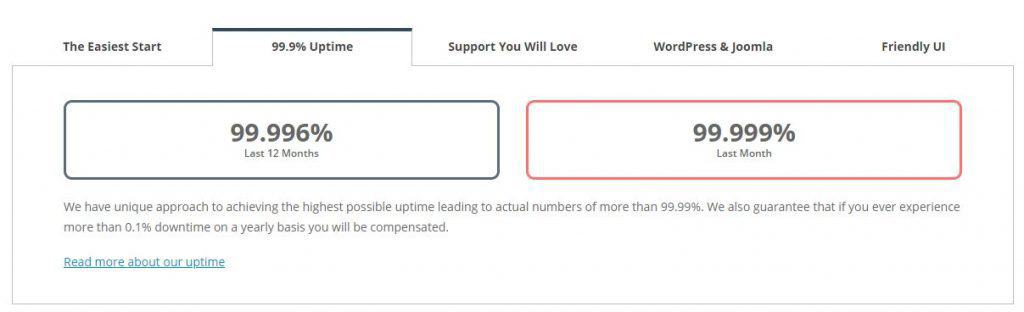
Siteground uptime is amazing. They have 99.99% uptime.
When you are a blogger, you want to trust and rely on your host to never go down. Of course things can happen and your website could go down but knowing that Siteground has a 99.99% uptime is reassuring.
I’ve been with Siteground for almost 2 years now and my blog has never gone down.
Customer Service
I’ve contacted Siteground support team many times with questions and they are always SUPER helpful! You can contact their support team via phone, chat, or tickets. I prefer to use Siteground’s chat and I never had to wait more than 1 minute to be connected to a support rep.

Pricing
Siteground offers affordable monthly plans. You can get plans starting at $3.95 a month!

SIMPLE step by step instructions on how to start a blog
Click here to go to SiteGround so you can follow along! You will go to their landing page and click “SIGN UP”

Choose a plan
Pick a plan that will work for you. When I first started, I went with the STARTUP PLAN. If you click here and sign up through this link, you can get a plan starting at $3.95 month.

Choose your Domain
Earlier we talked about Domain Names, so hopefully you already know which Domain you would like to use.
If you already registered your Domain name, click “I already have a Domain“. If you have not registered your domain name yet, click “Register a New Domain“.
Some people prefer to have their domain registered somewhere else, such as Godaddy and others prefer to keep it together. Regardless what option you decide on, you will need to renew your domain yearly.
When I started my blog, I registered my domain with Siteground.
So click the option that is best for you.

Review and Complete Your Information
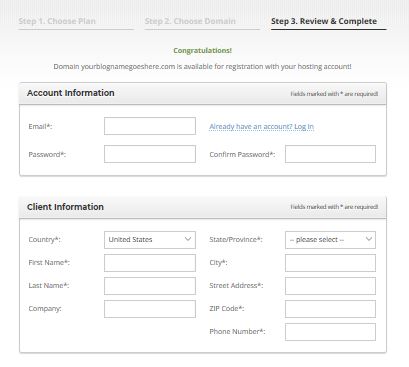
Add your Payment and Purchase Information

Extra Services
Here you can either check/uncheck any extra services you may need. I personally added Domain Privacy as I did not want my personal information publicly available.

Confirm that you agree to their terms and click pay now

CONGRATULATIONS!! You now have hosting for your blog!
Now comes the fun part – customizing and designing your blog.
iNSTALLING WordPress
You need to install WordPress: you can either do it yourself (just go to the cPanel and under auto install click WordPress then install) OR you can contact support via the chat and they will set it up for you.
If you do decide to ask support to do it for you, you will need to send them your login information.
PICK A THEME
After you have installed WordPress, you can now customize your blog!
You will need to install a theme. You can choose a free theme or purchase a paid theme. Free themes are usually limited while paid themes have more flexibility and support.
When I first started, I went with a free theme. I wanted to keep my blog on a budget. Now I am using a paid theme from Restored 316. You can purchase paid themes from many places such as Restored 316, Etsy, HungryJPEG, and Creative Market, and so many other places.
Once you picked and installed a theme you can customize the colors, the layout, font size, and so much more with your blog.

START BLOGGING
Now that your blog has been fully set up, you are ready to move to the next stages of growing your blog!
You will want to write several blog posts and get them published. Once your blog is live, you will want to start promoting your blog on social media platforms so you can drive traffic to your blog,.
SEO (search engine optimization) is the best way to drive traffic to your blog but it can take months to see results. So an easier and faster way to drive traffic to your blog is by promoting your blog on Pinterest.
If you are new to Pinterest, check out my Pinterest Blog posts:
- How To Find Keywords To Use With Pinterest
- THE ULTIMATE PINTEREST MARKETING STRATEGY
- WHAT TO DO WHEN YOUR PINTEREST TRAFFIC IS DROPPING
After that, you will want to apply to affiliate marketing programs so you can use affiliate links on your blog to earn to money. Here you can learn other ways To Make Money Blogging.
HAPPY BLOGGING!
This step by step guide on how to start a blog is just the beginning steps to blogging.
There is so much that can go into blogging that it is easy to get overwhelmed.
Stay positive and determined. Everyone’s blogging journey is different so don’t ever compare yourself to other bloggers.
You will be so happy with yourself a year from now for starting your blog today.
Need More Blogging Help?
10 Mistakes New Bloggers Make
How Bloggers Use Pinterest
Affiliate Programs You Should Join Today
